
Understanding Kafka Architecture: A Visual Breakdown for Modern Data Streaming
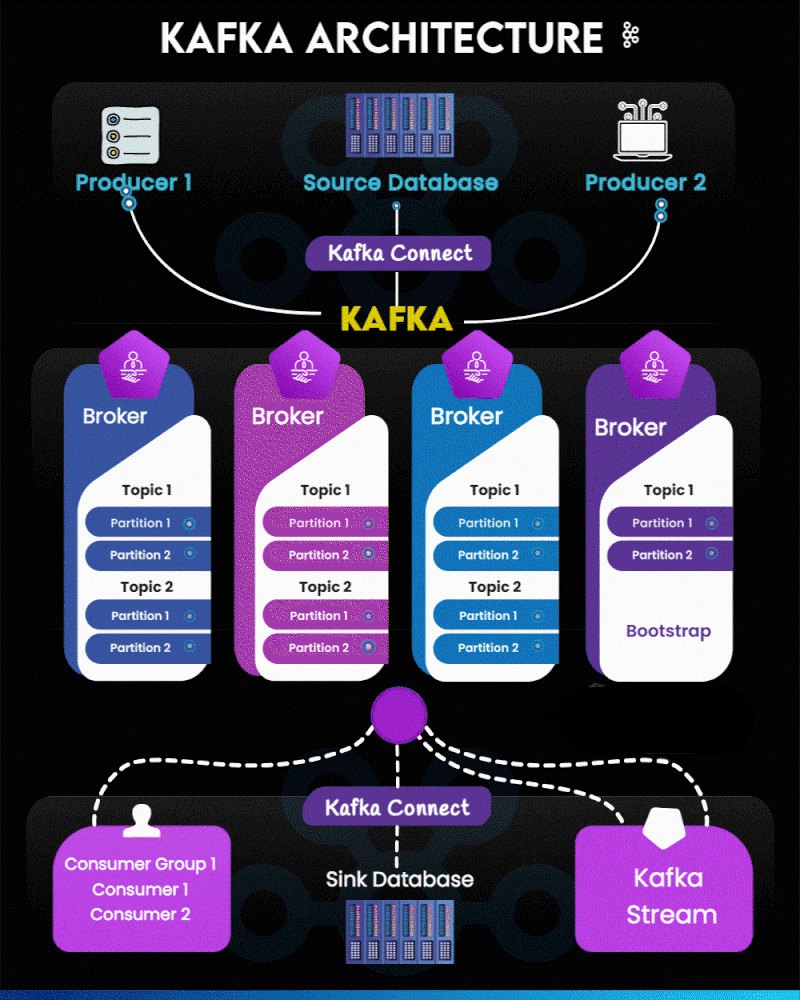
Apache Kafka has become the backbone of real-time data pipelines and event-driven applications. The architecture may look complex at first, but when visualized step-by-step, it becomes a beautifully orchestrated flow of producers, brokers, consumers, and connectors.
In this guide, we break down the Kafka architecture using a segmented version of the diagram for absolute clarity.
1. Data Producers & Source Systems
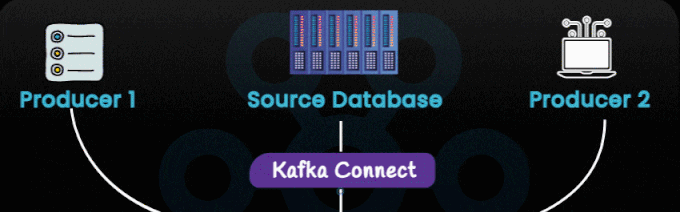
The architecture begins with multiple data producers such as:
- Custom applications
- Microservices
- Transactional systems
- Source Databases (ingested through Kafka Connect)
These sources generate continuous streams of data. Producers publish these events into Kafka topics. Unlike legacy pipelines, Kafka allows producers to send data without worrying about who consumes it—fully decoupling systems.
Key takeaway:
Kafka turns your systems into event publishers, allowing downstream services to tap into a live event feed.
2. Kafka Connect (Source Side)
Kafka Connect sits between external systems and the Kafka cluster, as shown in the first image section.
Its main functions include:
- Ingesting database changes
- Importing logs, tables, events, or API data
- Eliminating the need for custom ingestion code
Common connectors:
- JDBC source
- MongoDB source
- Debezium CDC
- Salesforce/ServiceNow APIs
Think of Kafka Connect as your plug-and-play data ingestion framework.
3. Kafka Cluster – Brokers, Topics & Partitions
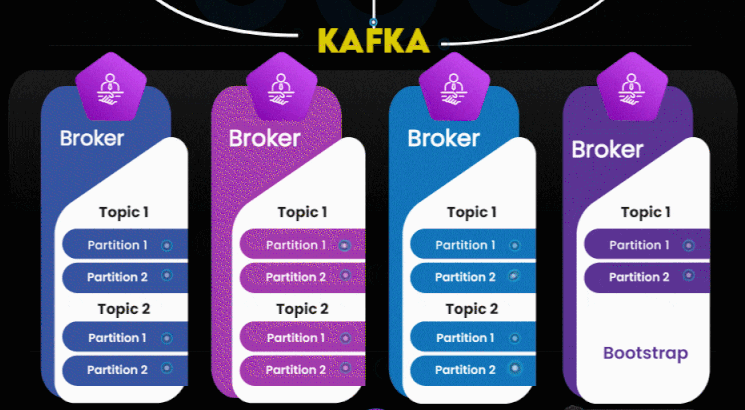
This is the heart of the architecture.
Kafka Brokers
A Kafka cluster is composed of multiple brokers, each responsible for:
- Storing messages
- Maintaining topic logs
- Handling producer/consumer requests
If one broker fails, others continue serving the cluster—ensuring high availability.
Topics & Partitions
Inside the brokers:
- Topics represent data categories (e.g., “orders”, “payments”).
- Topics are divided into partitions, allowing:
- Parallel processing
- Scalability
- Distributed storage
Kafka’s internal partitioning model is the primary reason it supports millions of events per second.
Bootstrap Server
One broker is typically used as a “bootstrap” for clients to discover the full cluster.
Key takeaway:
Kafka brokers create a horizontally scalable, fault-tolerant event backbone.
4. Kafka Connect (Sink Side)
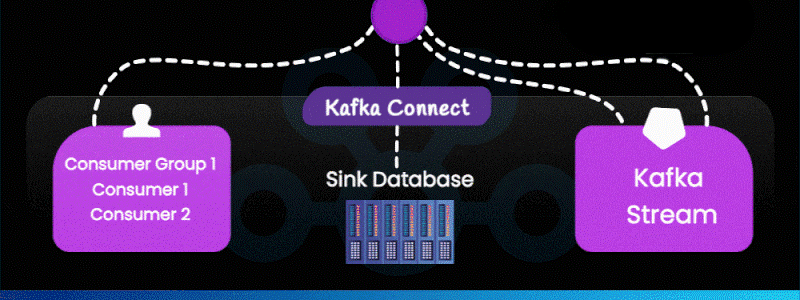
Kafka Connect also works in reverse—writing Kafka data into downstream systems such as:
- Databases
- Data warehouses
- Elasticsearch
- S3 storage
- BigQuery, Snowflake, Redshift
Sink connectors ensure real-time data delivery into analytics or storage systems.
5. Consumers & Consumer Groups
Consumers read data from Kafka topics. Kafka enables:
- Load balancing (multiple consumers in a group share partitions)
- Fault tolerance (if one consumer fails, others take over)
- Independent consumption (multiple applications can read the same data at their own pace)
Examples of consumer applications:
- Fraud detection engines
- Monitoring services
- ETL/ELT pipelines
- Notification systems
- Microservices
6. Kafka Streams – Real-Time Processing Layer
Kafka Streams (shown on the right side of the bottom image) is a lightweight stream processing library.
It enables:
- Filtering
- Joining streams
- Aggregations
- Windowing
- Stateful transformations
All processing happens in real time, allowing Kafka to support complex event processing without external systems.
End-to-End Flow Summary
Producers → Kafka Connect (Source) → Brokers → Topics → Partitions → Consumers / Kafka Streams → Kafka Connect (Sink)
In simpler words:
Kafka allows your entire data ecosystem to communicate in real time, reliably and at massive scale.
Why Kafka Is Essential for Modern Architecture
- It powers real-time analytics
- Decouples microservices
- Handles huge volumes of data with low latency
- Integrates seamlessly with databases, BI tools, and cloud platforms
- Serves as the central event backbone for modern enterprises
Kafka is not just a message queue—it’s the foundation of event-driven architecture.
Leave a Reply